Coastal Dunes Procreate Color Palette Review
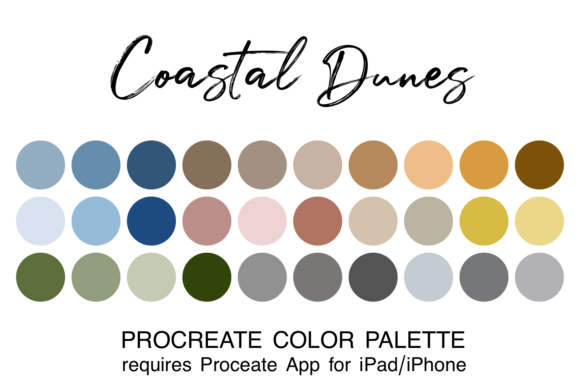
Digital artists often spend a significant portion of their creative time selecting colors rather than executing brushstrokes. The Coastal Dunes Procreate Color Palette addresses this friction by offering a pre-curated selection of 30 hues designed to replicate the serene atmosphere of seaside environments. This palette captures the earthy tones of the coast, blending sandy beaches, ocean blues, warm dunes, and lush greenery into a cohesive set of muted blues, tans, and greens. For those creating landscapes, nature scenes, or rustic-inspired designs, this tool aims to streamline the workflow while ensuring color harmony.
Understanding the Coastal Dunes Collection
The core value of the Coastal Dunes Procreate Color Palette lies in its thematic consistency. Unlike random color generators, this collection is built around a specific visual narrative: the calm and natural feel of the shoreline. The 30 included colors are not merely distinct shades but are selected to work together, allowing for smooth gradients and balanced compositions without clashing tones.
The palette is distributed as a single ".swatch" file, a format native to the Procreate app on iPad and iPhone. This technical specification ensures that the colors integrate seamlessly into the software's interface, appearing immediately in the user's library upon installation. The collection avoids overly saturated neon tones in favor of muted, organic pigments that mimic the way light interacts with sand, water, and vegetation in a coastal setting.
Why Artists Seek Themed Palettes
There are several practical reasons why an artist might evaluate the Coastal Dunes Procreate Color Palette for their workflow. First, it eliminates "color decision fatigue." When starting a new piece, particularly a landscape, the sheer number of possible color combinations can be paralyzing. A curated set allows the creator to focus entirely on composition, lighting, and texture.
Secondly, themed palettes ensure stylistic consistency across a body of work. If an illustrator is creating a series of coastal scenes, using a dedicated palette guarantees that every image shares a unified color language. This is particularly useful for commercial projects where brand identity or a specific mood must be maintained throughout multiple assets.
Finally, these tools serve as educational resources. By analyzing how the colors in the Coastal Dunes Procreate Color Palette interact, beginners can learn about color theory in practice, observing how warm tans balance cool ocean blues and how desaturated greens add depth without overwhelming the scene.
Benefits and Practical Advantages
The primary benefit of this asset is efficiency. With 30 colors ready to use, the barrier to entry for creating complex atmospheric scenes is lowered. Users can experiment with layering and blending modes more quickly because they do not need to manually sample colors from reference photos constantly.
Additionally, the palette encourages a specific aesthetic outcome. The inclusion of muted tones helps prevent artwork from looking flat or overly digital. The natural variation within the swatches mimics the complexity of real-world environments, adding a sense of realism that can be difficult to achieve when picking colors individually.
For collaborative projects, sharing a specific .swatch file ensures that all team members are working with the exact same hex codes, reducing errors and revisions during the design phase.
Tradeoffs and Considerations
While the Coastal Dunes Procreate Color Palette offers significant advantages, there are tradeoffs to consider. The most notable limitation is the scope of the collection. With only 30 colors, the palette may lack the granular variety required for highly detailed photorealistic work where subtle shifts in hue are necessary. Artists working on portraits or urban settings may find the color range too restrictive.
Furthermore, reliance on a preset palette can sometimes lead to repetitive results. If an artist uses the same set of colors for every project, their work may begin to look uniform. It requires discipline to use the palette as a foundation rather than a strict rulebook, occasionally mixing in custom colors to break the pattern.
Another consideration is platform dependency. As noted in the product specifications, this file is specifically designed for the Procreate app on Apple devices. Artists who work primarily in Photoshop, Clip Studio Paint, or on non-Apple hardware cannot utilize this file directly without conversion, which adds an extra step to the workflow.
Ideal Use Cases
The Coastal Dunes Procreate Color Palette is a strong fit for specific types of creative projects. It is ideal for:
- Landscape Illustrations: Creating beach scenes, dune ecosystems, or coastal cityscapes where natural lighting is key.
- Rustic Design Projects: Developing branding, packaging, or web elements that require an earthy, organic, or vintage aesthetic.
- Mood Boards: Quickly assembling visual concepts for clients who want to convey a sense of tranquility or nature.
- Beginner Practice: Helping new users learn how to build a cohesive image without getting overwhelmed by color selection.
When to Consider Alternatives
Despite its strengths, this palette may not be the right choice for every situation. Artists focusing on high-energy, abstract, or futuristic themes will likely find the muted, earthy tones of the Coastal Dunes Procreate Color Palette limiting. In these cases, a palette featuring high-contrast neons or vibrant primaries would be more appropriate.
Additionally, if a project requires a vast array of skin tones or specific cultural color representations, a generic nature-themed palette may not provide sufficient diversity. Similarly, professionals working in print media who require precise CMYK values might prefer a tool that exports directly to print-ready formats rather than a screen-based .swatch file.
Installation and Setup Process
For those who decide the palette aligns with their needs, the installation process is straightforward but requires adherence to specific steps. Beginners must ensure they have the Procreate app installed on their iPad or iPhone. The file comes in a zipped format, which must be downloaded to the device's "Downloads" folder via the Files app.
- Download the zipped file containing the palette.
- Navigate to the Files app and unzip the archive.
- Click directly on the filename ending in ".swatch".
- The system will automatically prompt to open the file in Procreate.
- Once opened, the palette is saved to your library and will appear the next time you launch the app.
This seamless integration is a key feature of the Procreate ecosystem, allowing artists to move from download to creation in minutes.
Decision-Making Insights
Before acquiring the Coastal Dunes Procreate Color Palette, creators should assess their current workflow. If you frequently struggle to match colors in nature scenes or find yourself spending excessive time tweaking hue sliders, this tool offers a practical solution. However, if your work is highly experimental or spans diverse genres beyond nature and rustic themes, investing in a broader suite of color libraries or learning advanced color grading techniques might offer better long-term value.
Ultimately, the decision rests on whether the specific aesthetic of the coastal dunes matches your artistic vision. The palette is not a magic fix for poor composition, but it is a robust tool for enhancing color harmony in relevant subjects. By understanding both its capabilities and its limitations, artists can make an informed choice about whether this resource will genuinely improve their creative output.