Mastering the Watercolor Lion: A Procreate Workflow for Artists
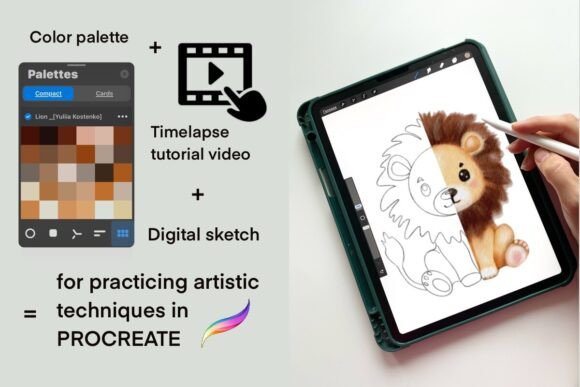
Creating illustrations in Procreate becomes significantly easier and more enjoyable when you have a consistent or themed color palette at your fingertips. The digital canvas offers infinite possibilities, but that very freedom can sometimes lead to creative paralysis. Instead of spending valuable minutes searching for the perfect shade of ochre or burnt sienna, having a curated set of colors allows you to focus entirely on the creative process. This is where the Watercolor Lion resource kit shines. By integrating a carefully selected Palette, a high-quality Sketch, and an instructional Video, artists can streamline their workflow and produce professional-grade watercolor effects with confidence.
The Power of Themed Color Palettes
Color theory is often taught as a rigid academic subject, but in practice, it is about feeling and flow. When you are working on a complex piece like a Watercolor Lion, the interplay between warm fur tones and cool shadow accents defines the realism and emotional impact of the artwork. Without a pre-set Palette, beginners and even experienced illustrators often find themselves toggling through thousands of system colors, breaking their concentration and disrupting the rhythm of their brushstrokes.
A dedicated Palette acts as a visual anchor. It ensures harmony across your work, preventing clashing hues that can make a piece look amateurish. In the context of this specific resource, the included swatches are not random; they are meticulously chosen to mimic the organic, bleeding nature of traditional watercolors. These digital swatches capture the essence of wet-on-wet techniques, dry brush textures, and subtle gradients found in real lion manes. By adding these carefully selected palettes to your collection of resources for Procreate, you are essentially giving yourself a shortcut to mastery.
This approach fits perfectly into modern digital art workflows. Whether you are creating assets for a children's book, designing merchandise, or simply practicing for personal growth, consistency is key. A themed Palette allows you to build a cohesive portfolio where every piece feels connected, even if the subjects vary. It removes the distraction of color hunting, letting you dive straight into the joy of painting.
Why the Watercolor Lion Sketch Matters
While color is crucial, structure is the foundation of any great illustration. The kit includes one digital Sketch in PNG format with a transparent background. This is a game-changer for artists who want to practice without the pressure of starting from a blank slate. The Sketch provides a solid anatomical framework, ensuring that the lion’s proportions, mane flow, and facial expression are accurate before a single drop of "digital paint" is applied.
Using a pre-drawn Sketch serves multiple purposes. For beginners, it eliminates the fear of drawing mistakes, allowing them to focus purely on coloring techniques. For advanced users, it offers a quick study opportunity to experiment with different lighting scenarios or texture overlays. The transparent background means you can easily layer this Sketch over other elements or use it as a clipping mask within Procreate, keeping your workspace organized and non-destructive.
Imagine the scenario: you open your iPad, load the project, and immediately see the outline of the majestic Watercolor Lion. You don't need to worry about whether the eyes are level or if the paws look natural. You can immediately start applying the Palette colors, watching the character come to life. This efficiency is what makes digital art so powerful, and resources like this maximize that potential.
Learning Through Motion: The Video Tutorial Advantage
Reading instructions is helpful, but seeing the process in action is transformative. That is why this resource bundle includes a link to a time-lapse Video tutorial hosted on YouTube, conveniently provided within a PDF file. Watching an artist work through the layers of a Watercolor Lion provides insights that static images simply cannot convey. You observe the pressure sensitivity, the speed of the strokes, and the order in which layers are built up.
The Video component bridges the gap between theory and practice. It demonstrates how the specific Palette interacts with the brushes used in Procreate. You might notice how the artist uses a light wash first, then builds up darker values, or how they use blending tools to create soft edges typical of watercolor. This observational learning accelerates your own skill development, helping you internalize techniques that you can apply to future projects beyond just lions.
Furthermore, the time-lapse format respects your time. You can watch hours of work condensed into minutes, absorbing the overall strategy without needing to sit through every single second of the creation process. It is a practical tool for busy creatives who want to learn effectively without sacrificing their schedule.
Seamless Integration into Your Procreate App
One of the most common hurdles for new digital artists is the technical setup. How do you actually get these custom colors into your app? The good news is that the process is straightforward once you know the steps, though it does require a bit of familiarity with the iPad's file system.
Warning for beginners: You must have the Procreate app installed on your iPad to use this color swatch file. These are digital items designed specifically for the iOS ecosystem, and physical goods are not shipped. Once you have confirmed your setup, here is the quick way to install the swatch:
- First, upload the compressed file (usually a .zip) to the Downloads folder on your iPad using the Files app.
- Navigate to the file and unzip it. This will reveal the actual swatch file inside.
- Open the unzipped file directly from the Files app. Select the option to "Share" or "Copy to Procreate."
- Paste the swatch name – it will automatically be added to your Procreate app under the Swatches tab.
Once installed, your new Palette is ready to go. You can access it instantly in any new project, making it a permanent part of your artistic toolkit. This seamless integration ensures that your resources are always within reach, ready to inspire your next masterpiece.
Ideal for All Skill Levels
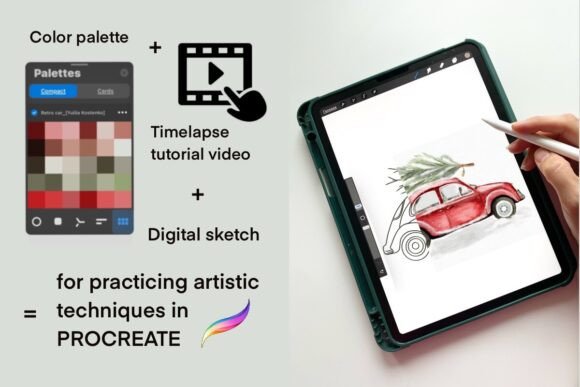
This product is perfect for practicing your artistic techniques in a relaxed environment, whether you are a beginner or an experienced artist. There is no judgment in the digital space, only opportunity. If you are just starting out, the combination of the Sketch and Palette provides a safety net that encourages experimentation. You can try bold colors or unusual shading without ruining a physical canvas or wasting expensive supplies.
For the seasoned illustrator, this kit offers a refreshing change of pace. Sometimes, stepping away from client work and engaging in a structured, fun exercise helps reignite creativity. Painting a Watercolor Lion using a pre-selected Palette forces you to think differently about value and saturation, potentially leading to new discoveries in your style. The included Video tutorial also serves as a reminder that there is always something new to learn, even after years of practice.
In the broader landscape of digital art, having a library of such resources is essential. It transforms your iPad from a simple tablet into a fully equipped studio. By investing in quality assets like this, you are not just buying a file; you are investing in your ability to create faster, better, and with more joy. The result is a workflow that feels less like work and more like play, where the barrier between imagination and execution is virtually non-existent.